天下脸皮共十分
我占八分

胖老婆代码

stephen阅读(155)

<template>
  <div class="draggable-table-container">
    <!-- 可见性控制复选框 -->
    <div class="visibility-controls">
      <label v-for="row in rows" :key="row.id" class="checkbox-label">
        <input
          type="checkbox"
          :checked="row.visible"
          @change="toggleVisibility(row.id)"
        />
        {{ row.label }}
      </label>
    </div>

    <table class="draggable-table">
      <thead>
        <tr>
          <th class="fixed-cell"></th>
          <th class="fixed-cell">客户号</th>
          <th v-for="(col, index) in columns" :key="`header-${col.key}`"
              :class="col.isMerged ? 'column-header merged-col-header' : 'column-header'">
            <span class="drag-icon column-drag" @mousedown="startColumnDrag($event, index)">
              ⋮⋮
            </span>
            {{ col.customerNo }}
          </th>
        </tr>
      </thead>
      <tbody>
        <template v-for="(row, rowIndex) in displayRows" :key="row.id">
          <tr :class="getRowClass(row)" :data-row-index="rowIndex">
            <!-- 第一列:分组标签或行标签 -->
            <td v-if="row.isGroupStart"
                :rowspan="row.groupRowCount"
                class="group-label">
              <span class="drag-icon row-drag" @mousedown="startRowDrag($event, rowIndex)">
                ⋮⋮
              </span>
              {{ row.groupLabel }}
            </td>
            <td v-else-if="row.isNormal"
                :colspan="row.merged ? 2 : 1"
                class="row-label">
              <span class="drag-icon row-drag" @mousedown="startRowDrag($event, rowIndex)">
                ⋮⋮
              </span>
              {{ row.label }}
            </td>

            <!-- 第二列:子标签 -->
            <td v-if="row.isGroupChild || row.isGroupStart" class="child-label">
              {{ row.label }}
            </td>
            <td v-else-if="row.isNormal && !row.merged" class="row-label-sub"></td>

            <!-- 数据列 -->
            <template v-for="(col, colIndex) in columns" :key="`${row.id}-${col.key}`">
              <!-- 如果是合并列,只在第一行渲染并跨越所有行 -->
              <td v-if="col.isMerged && rowIndex === 0"
                  :rowspan="displayRows.length"
                  class="data-cell merged-col-cell">
                {{ row.data[col.key] }}
              </td>
              <!-- 如果不是合并列,正常渲染 -->
              <td v-else-if="!col.isMerged"
                  class="data-cell">
                {{ row.data[col.key] }}
              </td>
              <!-- 如果是合并列但不是第一行,不渲染(已被rowspan覆盖) -->
            </template>
          </tr>
        </template>
      </tbody>
    </table>
  </div>
</template>

<script setup>
import { ref, computed } from 'vue'

// 列定义
const columns = ref([
  { key: 'col1', customerNo: 'C001' },
  { key: 'col2', customerNo: 'C002' },
  { key: 'col3', customerNo: 'C003' },
  { key: 'col4', customerNo: 'C004' },
  { key: 'col5', customerNo: 'C005' },
  { key: 'col6', customerNo: 'C006', isMerged: true }
])

// 原始行数据
const rows = ref([
  {
    id: 'customerNo',
    type: 'normal',
    label: '客户号',
    merged: true,
    visible: true,
    data: {
      col1: 'C001',
      col2: 'C002',
      col3: 'C003',
      col4: 'C004',
      col5: 'C005',
      col6: '暂无数据'
    }
  },
  {
    id: 'policy',
    type: 'normal',
    label: '保单号',
    merged: true,
    visible: true,
    data: {
      col1: 'P001',
      col2: 'P002',
      col3: 'P003',
      col4: 'P004',
      col5: 'P005',
      col6: '暂无数据'
    }
  },
  {
    id: 'name',
    type: 'normal',
    label: '姓名',
    merged: true,
    visible: true,
    data: {
      col1: '小1',
      col2: '小2',
      col3: '小3',
      col4: '小4',
      col5: '小5',
      col6: '暂无数据'
    }
  },
  {
    id: 'gender',
    type: 'normal',
    label: '性别',
    merged: true,
    visible: true,
    data: {
      col1: '男',
      col2: '女',
      col3: '女',
      col4: '女',
      col5: '男',
      col6: '暂无数据'
    }
  },
  {
    id: 'group1',
    type: 'group',
    label: '分组1',
    visible: true,
    children: [
      {
        id: 'group1-name',
        label: '姓名1',
        data: {
          col1: '分1',
          col2: '分2',
          col3: '分3',
          col4: '分4',
          col5: '分5',
          col6: '暂无数据'
        }
      },
      {
        id: 'group1-gender',
        label: '性别1',
        data: {
          col1: '男',
          col2: '女',
          col3: '女',
          col4: '女',
          col5: '男',
          col6: '暂无数据'
        }
      },
      {
        id: 'group1-age',
        label: '年龄1',
        data: {
          col1: '12',
          col2: '13',
          col3: '12',
          col4: '21',
          col5: '12',
          col6: '暂无数据'
        }
      }
    ]
  },
  {
    id: 'group2',
    type: 'group',
    label: '分组2',
    visible: true,
    children: [
      {
        id: 'group2-name',
        label: '姓名2',
        data: {
          col1: '分分1',
          col2: '分分2',
          col3: '分分3',
          col4: '分分4',
          col5: '分分5',
          col6: '暂无数据'
        }
      },
      {
        id: 'group2-gender',
        label: '性别2',
        data: {
          col1: '女',
          col2: '男',
          col3: '女',
          col4: '男',
          col5: '男',
          col6: '暂无数据'
        }
      },
      {
        id: 'group2-age',
        label: '年龄2',
        data: {
          col1: '22',
          col2: '23',
          col3: '22',
          col4: '21',
          col5: '32',
          col6: '暂无数据'
        }
      }
    ]
  }
])

// 将分组展开为显示行,只显示visible为true的行
const displayRows = computed(() => {
  const result = []
  rows.value.forEach(row => {
    // 只处理可见的行
    if (!row.visible) return

    if (row.type === 'group') {
      // 分组第一行 - 深拷贝data
      result.push({
        id: `${row.id}-0`,
        groupId: row.id,
        isGroupStart: true,
        groupLabel: row.label,
        groupRowCount: row.children.length,
        label: row.children[0].label,
        data: { ...row.children[0].data },
        rowType: 'group-start'
      })
      // 分组子行 - 深拷贝data
      row.children.slice(1).forEach((child, idx) => {
        result.push({
          id: child.id,
          groupId: row.id,
          isGroupChild: true,
          label: child.label,
          data: { ...child.data },
          rowType: 'group-child'
        })
      })
    } else {
      // 普通行 - 深拷贝data
      result.push({
        id: row.id,
        isNormal: true,
        label: row.label,
        merged: row.merged,
        data: { ...row.data },
        rowType: 'normal'
      })
    }
  })
  return result
})

// 切换行/分组的可见性
const toggleVisibility = (rowId) => {
  const rowIndex = rows.value.findIndex(r => r.id === rowId)
  if (rowIndex === -1) return

  const row = rows.value[rowIndex]

  // 如果当前是不可见状态,即将变为可见,需要移到最后
  if (!row.visible) {
    // 先切换状态
    row.visible = true

    // 将该行移动到数组末尾
    const newRows = [...rows.value]
    const [movedRow] = newRows.splice(rowIndex, 1)
    newRows.push(movedRow)
    rows.value = newRows
  } else {
    // 如果是可见状态,即将隐藏,只需切换状态
    row.visible = false
  }
}

// 获取行的CSS类
const getRowClass = (row) => {
  if (row.isGroupStart) return 'group-row'
  if (row.isGroupChild) return 'child-row'
  if (row.isNormal) return 'normal-row'
  return ''
}

// 行拖拽相关
let rowDragState = {
  dragging: false,
  dragIndex: -1,
  dragGroupId: null,
  placeholder: null
}

const startRowDrag = (event, rowIndex) => {
  event.preventDefault()

  const row = displayRows.value[rowIndex]
  rowDragState.dragging = true
  rowDragState.dragIndex = rowIndex

  // 如果是分组行,记录分组ID
  if (row.groupId) {
    rowDragState.dragGroupId = row.groupId
  }

  // 创建拖拽视觉反馈
  const draggedRow = event.target.closest('tr')
  draggedRow.classList.add('dragging')

  // 如果是分组,高亮所有相关行
  if (rowDragState.dragGroupId) {
    const allRows = document.querySelectorAll('tr')
    allRows.forEach(tr => {
      const idx = parseInt(tr.dataset.rowIndex)
      if (!isNaN(idx)) {
        const r = displayRows.value[idx]
        if (r.groupId === rowDragState.dragGroupId) {
          tr.classList.add('dragging')
        }
      }
    })
  }

  let lastY = event.clientY

  const onMouseMove = (e) => {
    const deltaY = e.clientY - lastY
    if (Math.abs(deltaY) < 5) return

    // 找到鼠标下的行
    const allRows = Array.from(document.querySelectorAll('tbody tr'))
    let targetRowElement = null

    for (let i = 0; i < allRows.length; i++) {
      const rect = allRows[i].getBoundingClientRect()
      if (e.clientY >= rect.top && e.clientY <= rect.bottom) {
        targetRowElement = allRows[i]
        break
      }
    }

    if (targetRowElement) {
      const targetIndex = parseInt(targetRowElement.dataset.rowIndex)
      if (!isNaN(targetIndex) && targetIndex !== rowDragState.dragIndex) {
        const targetRow = displayRows.value[targetIndex]

        // 清除之前的高亮
        allRows.forEach(r => r.classList.remove('drop-target'))

        // 如果目标是分组的一部分,找到分组的第一行
        if (targetRow.groupId) {
          // 找到同一分组的第一行
          for (let i = 0; i < displayRows.value.length; i++) {
            const row = displayRows.value[i]
            if (row.groupId === targetRow.groupId && row.isGroupStart) {
              // 在分组第一行上方显示drop提示
              const groupFirstRow = document.querySelector(`tr[data-row-index="${i}"]`)
              if (groupFirstRow) {
                groupFirstRow.classList.add('drop-target')
              }
              break
            }
          }
        } else {
          // 普通行直接高亮
          targetRowElement.classList.add('drop-target')
        }
      }
    }

    lastY = e.clientY
  }

  const onMouseUp = (e) => {
    // 找到目标位置
    let targetIndex = -1
    const allRows = Array.from(document.querySelectorAll('tbody tr'))
    let targetRowElement = null

    for (let i = 0; i < allRows.length; i++) {
      const rect = allRows[i].getBoundingClientRect()
      if (e.clientY >= rect.top && e.clientY <= rect.bottom) {
        targetRowElement = allRows[i]
        targetIndex = parseInt(allRows[i].dataset.rowIndex)
        break
      }
    }

    // 如果目标是分组的中间行,调整到分组的第一行
    if (targetIndex !== -1) {
      const targetRow = displayRows.value[targetIndex]
      if (targetRow.groupId && !targetRow.isGroupStart) {
        // 找到分组的第一行索引
        for (let i = 0; i < displayRows.value.length; i++) {
          const row = displayRows.value[i]
          if (row.groupId === targetRow.groupId && row.isGroupStart) {
            targetIndex = i
            break
          }
        }
      }
    }

    // 清除样式
    allRows.forEach(r => {
      r.classList.remove('dragging', 'drop-target')
    })

    // 执行移动
    if (targetIndex !== -1 && targetIndex !== rowDragState.dragIndex) {
      moveRow(rowDragState.dragIndex, targetIndex)
    }

    rowDragState.dragging = false
    rowDragState.dragGroupId = null
    document.removeEventListener('mousemove', onMouseMove)
    document.removeEventListener('mouseup', onMouseUp)
  }

  document.addEventListener('mousemove', onMouseMove)
  document.addEventListener('mouseup', onMouseUp)
}

const moveRow = (fromIndex, toIndex) => {
  const fromRow = displayRows.value[fromIndex]

  // 找到在原始数据中的索引
  let sourceRowIndex = -1
  let targetRowIndex = -1

  if (fromRow.groupId) {
    // 移动分组
    sourceRowIndex = rows.value.findIndex(r => r.id === fromRow.groupId)
  } else {
    // 移动普通行
    sourceRowIndex = rows.value.findIndex(r => r.id === fromRow.id)
  }

  // 找到目标位置
  const toRow = displayRows.value[toIndex]
  if (toRow.groupId) {
    targetRowIndex = rows.value.findIndex(r => r.id === toRow.groupId)
  } else {
    targetRowIndex = rows.value.findIndex(r => r.id === toRow.id)
  }

  if (sourceRowIndex !== -1 && targetRowIndex !== -1) {
    const newRows = [...rows.value]
    const [movedRow] = newRows.splice(sourceRowIndex, 1)

    // 调整目标索引
    if (sourceRowIndex < targetRowIndex) {
      targetRowIndex--
    }

    newRows.splice(targetRowIndex, 0, movedRow)
    rows.value = newRows
  }
}

// 列拖拽相关
const startColumnDrag = (event, dragIndex) => {
  event.preventDefault()

  let dropIndex = dragIndex

  const onMouseMove = (e) => {
    const headers = Array.from(document.querySelectorAll('.column-header'))
    for (let i = 0; i < headers.length; i++) {
      const rect = headers[i].getBoundingClientRect()
      if (e.clientX >= rect.left && e.clientX <= rect.right) {
        dropIndex = i
        headers.forEach(h => h.classList.remove('drag-over'))
        headers[i].classList.add('drag-over')
        break
      }
    }
  }

  const onMouseUp = (e) => {
    document.querySelectorAll('.column-header').forEach(h => h.classList.remove('drag-over'))

    if (dropIndex !== dragIndex) {
      swapColumns(dragIndex, dropIndex)
    }

    document.removeEventListener('mousemove', onMouseMove)
    document.removeEventListener('mouseup', onMouseUp)
  }

  document.addEventListener('mousemove', onMouseMove)
  document.addEventListener('mouseup', onMouseUp)
}

const swapColumns = (fromIndex, toIndex) => {
  console.log('交换列:', fromIndex, '->', toIndex)
  console.log('交换前columns:', columns.value.map(c => c.customerNo))

  // 只交换列定义的顺序,数据保持不变
  const newColumns = [...columns.value]
  const temp = newColumns[fromIndex]
  newColumns[fromIndex] = newColumns[toIndex]
  newColumns[toIndex] = temp

  columns.value = newColumns

  console.log('交换后columns:', columns.value.map(c => c.customerNo))
  console.log('列交换完成 - 数据保持不变,模板会根据新的列顺序重新渲染')
}
</script>

<style scoped>
.draggable-table-container {
  padding: 20px;
  overflow: auto;
}

/* 可见性控制复选框样式 */
.visibility-controls {
  margin-bottom: 20px;
  padding: 15px;
  background: #f5f5f5;
  border-radius: 8px;
  border: 1px solid #e0e0e0;
  display: flex;
  flex-wrap: wrap;
  gap: 15px;
}

.checkbox-label {
  display: inline-flex;
  align-items: center;
  cursor: pointer;
  user-select: none;
  padding: 5px 10px;
  background: white;
  border-radius: 4px;
  border: 1px solid #d0d0d0;
  transition: all 0.2s;
}

.checkbox-label:hover {
  background: #e8f4ff;
  border-color: #1890ff;
}

.checkbox-label input[type="checkbox"] {
  margin-right: 8px;
  cursor: pointer;
  width: 16px;
  height: 16px;
}

/* C006 合并列样式 */
.merged-col-header {
  background: #e8e8e8 !important;
  font-weight: 600;
}

.merged-col-cell {
  background: #f9f9f9;
  color: #999;
  font-style: italic;
  text-align: center;
  vertical-align: middle;
  border-left: 2px solid #d0d0d0;
  min-width: 150px;
}

.draggable-table {
  border-collapse: collapse;
  width: 100%;
  background: white;
  box-shadow: 0 2px 8px rgba(0, 0, 0, 0.1);
}

.draggable-table th,
.draggable-table td {
  border: 1px solid #e0e0e0;
  padding: 12px 16px;
  text-align: center;
  position: relative;
  vertical-align: middle;
}

.draggable-table th {
  background: #f5f5f5;
  font-weight: 600;
  color: #333;
  white-space: nowrap;
}

.fixed-cell {
  background: #e8e8e8 !important;
  width: 120px;
  min-width: 120px;
}

.column-header {
  cursor: pointer;
  user-select: none;
  position: relative;
  padding-left: 35px;
  width: 150px;
  min-width: 150px;
  text-align: center;
  transition: background 0.2s;
}

.column-header:hover {
  background: #ebebeb;
}

.column-header.drag-over {
  background: #d0e8ff;
  border: 2px dashed #1890ff;
}

.group-label,
.row-label {
  background: #fafafa;
  font-weight: 500;
  padding-left: 35px;
  position: relative;
  text-align: left;
  min-width: 120px;
}

.child-label {
  background: #fafafa;
  font-weight: 400;
  color: #555;
  text-align: left;
  min-width: 120px;
}

.row-label-sub {
  background: #fafafa;
  min-width: 120px;
}

.data-cell {
  min-width: 150px;
}

.drag-icon {
  display: inline-block;
  cursor: move;
  color: #999;
  font-size: 16px;
  user-select: none;
  padding: 2px 4px;
  position: absolute;
  left: 8px;
  top: 50%;
  transform: translateY(-50%);
}

.drag-icon:hover {
  color: #666;
  background: rgba(0, 0, 0, 0.05);
  border-radius: 3px;
}

.column-drag {
  writing-mode: horizontal-tb;
  letter-spacing: -2px;
}

.row-drag {
  writing-mode: vertical-lr;
  letter-spacing: -4px;
  line-height: 1;
}

.group-row {
  background: #fafafa;
}

.child-row {
  background: white;
}

.child-row:hover,
.normal-row:hover {
  background: #f9f9f9;
}

/* 拖拽样式 */
tr.dragging {
  opacity: 0.5;
  background: #e3f2fd !important;
}

tr.dragging td {
  background: #e3f2fd !important;
}

tr.drop-target {
  border-top: 3px solid #1890ff;
}
</style>

join原理

stephen阅读(796)

Guarded Suspension

即保护性暂停,用在一个线程等待另一个线程的执行结果
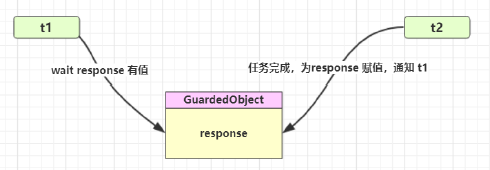
image-20210102211155242

要点

  • 有一个结果需要从一个线程传递到另一个线程,让他们关联同一个 GuardedObject
  • 如果有结果不断从一个线程到另一个线程那么可以使用消息队列(见生产者/消费者)
  • JDK 中,join 的实现、Future 的实现,采用的就是此模式
  • 因为要等待另一方的结果,因此归类到同步模式

守护类

 package tech.ityoung.study.demo.jvm.juc;
 ​
 import lombok.extern.slf4j.Slf4j;
 ​
 @Slf4j
 public class GuardedObject {
     private Object lock = new Object();
     private Object response = null;
 ​
     public Object get(long waitTime) {
         synchronized (lock) {
             long begin = System.currentTimeMillis();
             long start = 0;
             while (response == null) {
                 if (waitTime - start <= 0) {
                     break;
                }
                 try {
                     lock.wait(waitTime - start);
                } catch (InterruptedException e) {
                     e.printStackTrace();
                }
                 long now = System.currentTimeMillis();
                 start = now - begin;
            }
             log.info("get response completed");
             return response;
        }
    }
 ​
     public void complete(Object response) {
         synchronized (lock) {
             while (response != null) {
                 this.response = response;
                 lock.notifyAll();
                 break;
            }
        }
    }
 }

测试类

主线程等待子线程返回结果

等待时间内如果返回结果,则wait提前结束,否则wait时间后结束返回null

 package tech.ityoung.study.demo.jvm.juc;
 ​
 import lombok.extern.slf4j.Slf4j;
 ​
 import java.util.Random;
 ​
 @Slf4j
 public class GuardedObjectTest {
     public static void main(String[] args) throws InterruptedException {
         log.info("starting demo");
         GuardedObject guardedObject = new GuardedObject();
         new Thread(() -> {
             int response = 0;
             try {
                 response = getResponse();
            } catch (InterruptedException e) {
                 e.printStackTrace();
            }
             guardedObject.complete(response);
        }).start();
         Object o = guardedObject.get(5000);
         log.info("getting finished: {}", o);
    }
 ​
     private static int getResponse() throws InterruptedException {
         Thread.sleep(4000);
         return new Random(5).nextInt();
    }
 }

jasonformat

stephen阅读(616)

日期属性加上

@jsonformat(pattern = timezone =

temporary

stephen阅读(584)

String str = System.getProperty(“user.dir”)